
Quick Intro – Let’s Set the Scene
I’ve run more SEO audits than I can count—some with minor issues, others that made me want to hide under my desk. While no site is perfect, most audit problems come from the same handful of repeat offenders.
This post isn’t a scare tactic. It’s a practical walkthrough of the mistakes I see most often and how I actually fix them (yes, with real tools and real logic—not just “best practices” sprinkled with wishful thinking).
What You’ll Learn
- Why your site might look “fine” but still struggle to rank
- How small technical tweaks can lead to big visibility wins
- What SEO tools often miss (and how to catch it yourself)
- Real solutions—not “just remove the noindex tag” and call it a day
Let’s dig in.
2. Mistake: Blocking Google From Crawling Pages
The Problem: Your site might be telling Google: “Go away.”
The Fix: Check robots.txt. Look for lines like:
User-agent: *
Disallow: /
If you see that, your site’s literally closed for business (at least to search engines). Delete it. You want Google to come in, browse around, and find what it needs—like a polite robot shopper.
For more on why this matters, I broke it down in my guide to what an SEO audit is and why it matters.
3. Mistake: Accidentally Blocking Indexing
The Problem: Pages are live—but invisible to Google.
The Fix: Look for rogue <meta name=”robots” content=”noindex”> tags. I’ve found these hiding in blog templates, landing pages, and once—in a client’s homepage. True story.
I use Ahrefs’ Site Audit or Screaming Frog to scan for noindex tags in bulk. Then I yank them off anything that should be searchable.
4. Mistake: Not Matching Search Intent
The Problem: You’re targeting the right keyword with the wrong page.
The Fix: Check what’s already ranking. If your competitors are ranking free tools or tutorials, but you’re serving a sales page—Google’s not buying it.
I learned this one the hard way when a how-to guide I wrote tanked. Turns out, searchers were actually looking for a tool. Fixed the intent, traffic jumped.
Need help with matching content type to keywords? It’s part of the process in my full SEO audit guide.
5. Mistake: Missing Internal Links
The Problem: Pages are floating in space, unlinked and lonely.
The Fix: Use an internal link audit to find these orphans. Internal links guide users and bots. No path = no traffic.
I keep a list of internal link opportunities during every audit. Then I revisit older posts (like my SEO audit checklist) and add relevant links where it makes sense.
6. Mistake: Slow Site Speed
The Problem: Your site loads like it’s stuck in 2004.
The Fix: Compress images, enable caching, and limit JavaScript. Core Web Vitals aren’t just ranking signals—they’re rage-quit triggers for users.
I typically pair technical audit insights with speed tests using PageSpeed Insights or GTmetrix. And if I find GIFs from 2010 still loading? You know what happens.
7. Mistake: Under-optimized Titles and Descriptions
The Problem: Your page title sounds like a robot threw up keywords.
The Fix: Write titles for clicks and context. I aim for clarity, with one strong phrase up front.
Avoid stuffing. This isn’t a turkey—there’s no prize for cramming in every synonym.
Example? “SEO Audit for Beginners: Fix These 10 Common Mistakes” works better than “Audit SEO Errors Fixing Mistakes Checklist Best.” Obvious? Apparently not to everyone.
8. Mistake: Keyword Stuffing (Still a Thing, Sadly)
The Problem: You’re overusing the same word like it’s paying rent.
The Fix: Use synonyms, natural phrasing, and cover subtopics instead of repeating the same phrase every third sentence.
I always remind myself: Google’s smarter than that. People are too.
9. Mistake: Ignoring Alt Text
The Problem: Your images are silent.
The Fix: Add alt text that actually describes the image. It helps with accessibility and rankings—especially in Google Images.
I don’t overthink it. “Screenshot of SEO audit dashboard” is better than “SEO SEO SEO audit audit 2025 dashboard.” (Yes, I’ve seen worse.)
10. Mistake: Treating SEO Like a One-Time Fix
The Problem: You fix issues once and walk away like it’s done.
The Fix: SEO isn’t a checklist. It’s a system that needs monitoring.
My advice? Set monthly reviews. If you’re reporting regularly (check out my SEO report tips), you’ll catch issues before rankings drop.
11. Mistake: Scaling Low-Quality AI Content
The Problem: You’re mass-producing blog posts like a content sweatshop.
The Fix: Use AI to assist—not replace. Add your experience, opinions, or case data. Otherwise, your content is just another bland post in a sea of sameness.
I often use AI to help outline ideas. But then I rewrite and add examples that actually mean something—like the real audit case I shared here.
12. Mistake: Buying Links
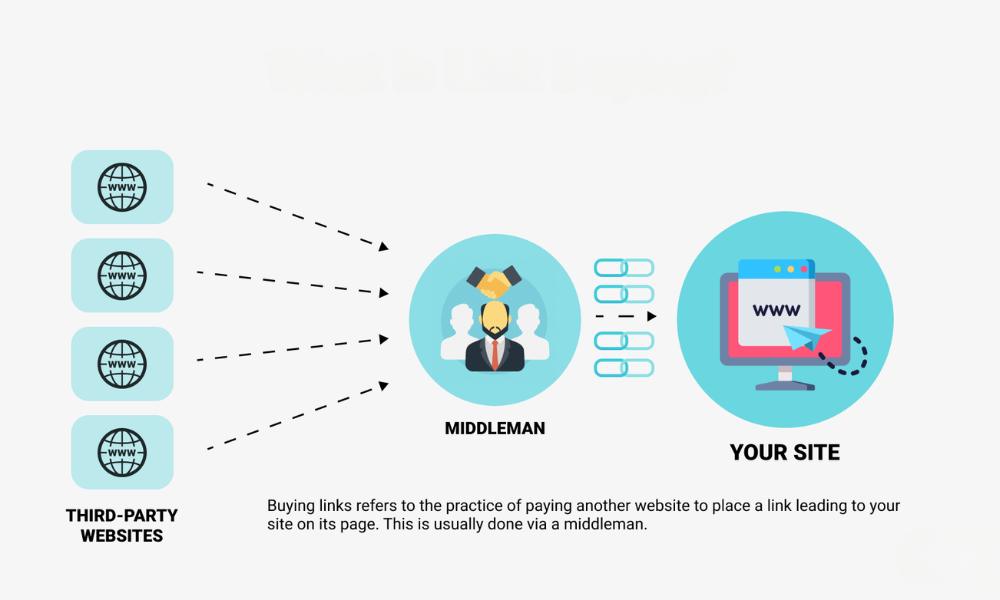
The Problem: Paying for links and hoping Google doesn’t notice.
The Fix: Stop. It’s risky and outdated. Focus on earning links with content people actually want to reference.
(I once had a client proudly show me 40 paid backlinks… 38 of which came from sites about pet insurance. They sold software. You can guess how well that worked out.)
13. Mistake: Skipping Schema or Using It Wrong
The Problem: Either no schema, or schema spam.
The Fix: Use only relevant structured data that reflects the actual page content. Google’s not dumb—they’ll catch irrelevant markup.
Need a refresher on proper setup? It’s something I include in every repeatable audit process I run.
Final Thoughts (No Soapbox Here)
SEO audits aren’t meant to find everything. They’re meant to find what matters now. Fix these common mistakes, and your rankings, traffic, and sanity will thank you.
If you want to go deeper, I’ve got a full post on how to read an audit report, and another on how often you should audit your site.
I do audits because they work. Not because they’re pretty.