
Let me start with a confession: I’ve seen websites that looked stunning on the outside, but underneath? Broken links, crawl issues, pages lost in the index void… it’s like giving Google a puzzle with half the pieces missing.
A proper website check-up—what most folks call a site audit—isn’t glamorous, but it’s necessary. And in 2025, when search engines are faster, smarter, and more selective, skipping this process is like trying to rank with your shoelaces tied together.
So here’s how I personally run a complete site audit, broken down step by step. No jargon bombs, no endless theory—just a practical guide to how I approach things in real-world projects.
What You’ll Walk Away With:
- How I find out if Google can even see your site
- Where speed, structure, and usability still go wrong (even in 2025)
- How I assess content quality and link trustworthiness
- Tools I actually use (yes, there are many—no, you don’t need them all)
- How to make an action plan from the results
1. Check if Your Site’s in Search Engines
This is always my first move. I use a simple trick:
Search site:yourdomain.com in Google.
If you see no results—or weird, outdated pages—there’s a problem. I once audited a client site that was fully functional but completely invisible. The culprit? A “noindex” tag left in production by accident. Oops.
Head to Google Search Console > Pages section. You’ll see which URLs are showing up and why others aren’t.
Tip: Not every page needs to be indexed. Redirects, admin panels, and duplicate product pages can sit this one out.
2. Crawl the Site for Hidden Issues
I run crawlers like Screaming Frog, Sitebulb, or SEMrush. Think of this like an X-ray for your domain. It tells me what’s working and what’s quietly breaking.
What I’m looking for:
- Broken internal links (hello, 404 errors)
- Redirect chains (especially on large ecommerce sites)
- Orphaned pages (live, but unlinked)
- Canonical mishaps (telling Google the wrong version is the right one)
Check this guide on Top SEO Audit Tools for my tool recommendations.
3. Eliminate Duplicate Versions
This one’s basic, but people miss it all the time.
Visit your site with and without “www”, and using both “http” and “https”. Do they all land on the same version?
If not, set up 301 redirects. It’s like telling search engines, “Hey, THIS is the real homepage.”
Stick to HTTPS—it’s safer, faster, and has been Google’s preference for years.
4. Test Mobile Experience

Google judges your site primarily on how it performs on mobile devices. Even in 2025, I still find sites that look mobile-friendly but don’t feel usable.
My checklist:
- Can I read the text without pinching?
- Are buttons big enough to tap?
- Do images break the layout?
- Does the page load in under 3 seconds?
Use Google’s Mobile Usability tool inside Search Console, or run your pages through PageSpeed Insights.
5. Review Web Vitals (Yes, Still Important)
Search engines continue to look at user experience metrics—specifically:
- LCP (Largest Contentful Paint): should be under 2.5s
- INP (Interaction to Next Paint): keep it below 200ms
- CLS (Cumulative Layout Shift): avoid jumpy elements
GSC shows you where these issues crop up. I work closely with developers to fine-tune layout shifts, lazy-load large images, and clean up render-blocking scripts.
Sometimes improving performance is less about plugins and more about removing things you don’t need.
6. Analyze Speed—Real User Speed
Forget chasing a perfect 100 score. Focus on how the page actually behaves.
- Does the main content show up fast?
- Is the interaction smooth?
- Are third-party scripts dragging it down?
Use Chrome DevTools for real load timing. Consider a CDN, optimized fonts, and serving images in WebP or AVIF format.
7. Audit On-Page Elements
This is the part where we fine-tune the details.
Things I check:
- Title tags (make them distinct and relevant, not stuffed)
- Meta descriptions (don’t ignore them—they affect clicks)
- Heading structure (one H1, clear hierarchy)
- URL slugs (short and descriptive)
- Internal links (useful, not excessive)
I start with key pages: homepage, top product or service pages, and high-traffic blog posts.
8. Review Content Depth and Clarity
A good page should:
- Answer the user’s question
- Be original (not scraped or spun)
- Be skimmable
- Be current
I sort pages into:
- Keep (doing well)
- Improve (needs better data or clarity)
- Merge (similar posts competing for the same topic)
- Remove (dead weight)
I go deeper into this in Using SEO Audits to Fuel Content Strategy.
9. Backlink Quality, Not Just Quantity
I check:
- Where links are coming from
- What anchor text they use
- Whether they’re natural or… suspicious
Sites linking to casinos, payday loans, or nothing related? Probably not helping. A few spammy links are fine—too many might raise red flags.
Explore more in Top SEO Audit Tools.
10. Check Organic Traffic Trends
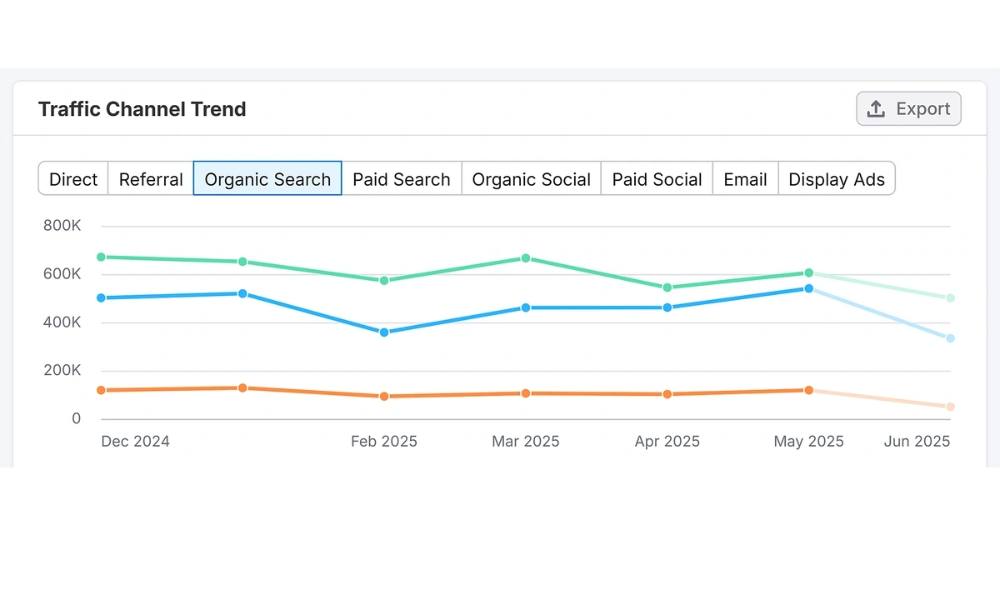
Open Search Console > Performance.
Here’s what I look for:
- Traffic dips or sudden spikes
- Keywords driving traffic
- Pages getting views but no clicks (needs better metadata or titles)
Pair this with Monthly SEO Reports to spot long-term trends.
11. Compare Against Competitors
I plug client domains into Semrush’s Domain Overview and compare with 2–3 close rivals.
Metrics I look at:
- Ranking keywords
- Estimated organic visits
- Link profile size
- Site health score
Then I identify content gaps and link opportunities.
12. Prioritize Fixes
No one likes an endless task list. I organize everything into:
- Urgent: Indexing issues, broken links, major speed bottlenecks
- Important: Metadata improvements, outdated content
- Optional: Structured data, alt text, page order tweaks
Want a format that works? Use SEO Audit Templates.
13. Re-Audit Regularly
This isn’t a one-and-done task. Things break. Google updates. Sites change.
I recommend:
- Light reviews monthly
- Full audits quarterly
- Formal re-checks every 6 months
For more timing tips, see How Often Should You Run an SEO Audit?
Final Words (No Buzzwords, Promise)
I’ve worked with businesses that were stuck in traffic plateaus for years—until we fixed the basics. And guess what? Most of those “basics” are what I’ve just walked through here.
You don’t need a giant team or expensive software. You need a clear process, a bit of curiosity, and the will to fix what’s broken.
I do this for clients. I do it for my own sites. And yes, I still mess up sometimes—because this isn’t about being perfect. It’s about being useful to both users and search engines.
Need a second pair of eyes on your site? Reach out. I’ve got checklists, caffeine, and crawlers ready.