
I’ve seen this too often: teams publish articles, landing pages, and guides with all the best intentions—but zero performance. Everything looks great. The formatting is clean, the writing is sharp, the headline is catchy… but traffic flatlines.
Why? Because strategy came before diagnostics.
In my work, the most impactful digital strategies begin with a full website checkup. And yes, I’m talking about the kind that uncovers the problems lurking behind your content’s poor performance, like a missing internal link or an invisible page.
Let me show you how I use SEO intelligence (no fortune cookies or guesswork required) to guide the entire content planning process, from topic selection to optimization.
You’ll learn how to:
- Identify what your site is missing
- Find and fix hidden performance blockers
- Spot outdated pages before your readers do
- Turn insights into a focused publishing plan
- Use real data to shape your future content pipeline
Let’s get into it. No fluff—just strategy backed by action.
The Problem: Why Content Fails Without Technical Insight
Before we get to the solutions, let’s address what’s broken.
A lot of strategies are fueled by marketing trends, not data. Teams brainstorm topics, assign writers, and hit publish—hoping it aligns with what people are searching for. Hope, by the way, isn’t a metric I track.
Without technical signals or visibility data, here’s what usually happens:
- Articles get written on irrelevant topics
- Important pages never get crawled or indexed
- Valuable pieces underperform for months—or forever
- Internal links are missing, leaving content isolated
These issues aren’t always visible on the surface. That’s where technical review comes in. It’s the step that tells me what’s really happening behind the scenes.
I explained a few of these common pitfalls in detail here, if you’re wondering what to avoid.
What I Look for First: Gaps in Coverage and Demand
A strong strategy starts by identifying what’s missing—not just what’s broken.
One of my go-to techniques involves competitor comparison. I look at the topics others are ranking for that you aren’t covering yet. These often turn into your next best-performing pages.
Here’s what I pay attention to:
- Search terms that match your niche but have no content yet
- High-volume queries with low competition
- Topic clusters that deserve their own hub
This process is also where I source fresh ideas. Not from my imagination—but from real audience searches and gaps in the site’s current structure.
I walk through my full research process in this guide: How to Perform a Full SEO Audit in 2025.
Breathing Life into Older Pages
Creating something new is great. But what about the good stuff that’s already out there… and just needs a little attention?
Old posts that once performed well can drop off quietly. Sometimes it’s because the information is outdated. Other times, the content is buried too deep in your site’s hierarchy. In a few cases, it just got passed by faster, more relevant pieces from competitors.
Here’s how I evaluate existing work:
- Is the page still bringing traffic?
- Are rankings slipping slowly?
- Has someone else published a better version of this topic?
If I see signs of decline, I don’t jump to delete. Instead, I assess whether it can be refreshed—maybe with a faster page load, better examples, or clearer structure.
I’ve covered this in more depth in my SEO audit checklist for folks who want a hands-on framework.
Linking Strategy: The Quiet Force Behind Strong Pages
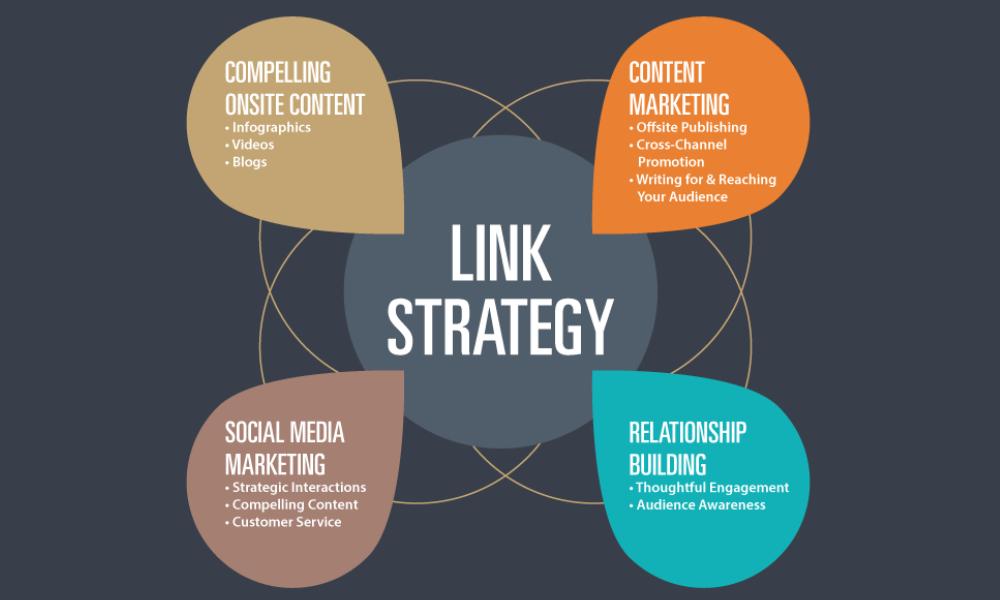
If you only publish and forget, you’re missing half the point of a solid strategy.
I use link structure diagnostics to map how information flows through a site. You’d be surprised how often a great post goes unnoticed simply because nothing links to it.
When internal links are missing, pages don’t build authority—or help users navigate deeper. I fix this by:
- Auditing which important posts have zero inbound links
- Connecting relevant pages with anchor text that mirrors search intent
- Updating older content to link to newer resources
This boosts visibility, ranking power, and usability all in one shot.
Quick tip: orphaned pages often don’t make it into your XML sitemap either, so be sure you’ve reviewed that as well. You can read more about the technical content divide here.
When Your Content Competes With Itself
It happens. Two or three posts targeting nearly the same keyword—but none of them rank because they confuse the algorithm.
This overlap usually happens when content creation moves faster than content planning.
I handle this by checking for:
- Duplicate keyword targeting
- Similar headlines and angles
- Fluctuating rankings across multiple URLs
My fix? Pick the stronger page, merge in supporting info from the others, and redirect or repurpose the rest.
The result is one definitive, better-ranking page instead of several weak ones.
Pages Google Can’t See Don’t Count

This part always stings a little.
You create a beautiful article. Add visuals. Optimize the copy. Hit publish. But for some reason, it’s not ranking—or even showing up.
If I had a nickel for every noindexed masterpiece I’ve found, I’d have enough for premium hosting.
Here’s what I check when that happens:
- Crawl logs: Is Google even accessing the URL?
- Meta tags: Is there a sneaky “noindex” sitting in your code?
- Sitemap inclusion: Is the page submitted to Google at all?
- Robots.txt: Blocking resources that affect rendering?
If any of those are off, it doesn’t matter how “SEO-optimized” your writing is—it’s invisible.
For a walkthrough on diagnosing indexing issues, check this quick read: What Is an SEO Audit?
Translating Technical Insights into Content Planning
Now, the fun part: turning analysis into a content game plan.
Once I’ve completed a technical and performance review, here’s how I structure the editorial calendar:
- Fix and improve: Prioritize underperformers, cannibalization cases, and pages with poor visibility.
- Create based on gaps: Use competitor comparisons and internal search data to decide what’s missing.
- Organize by themes: Build clusters and hubs around topics that tie together—think pillar content with related support pages.
- Monitor monthly: Use tools (and your brain) to track which changes actually move the needle.
If you’re wondering what to include in regular review cycles, I’ve explained that in my guide to monthly SEO reporting.
The Tools That Make All This Easier
Look, I’m fast—but I’m not psychic.
To extract insights quickly, I rely on:
- Screaming Frog (site crawls)
- Google Search Console (visibility & indexing issues)
- Ahrefs or Semrush (keyword data, gap analysis)
- Google Analytics (user behavior)
- Content audit templates (my own format shared here)
Without these, I’d still be manually comparing spreadsheets and XML files—which, honestly, is only fun the first 20 times.
Wrapping It Up
Your website is full of potential. But potential doesn’t drive traffic—performance does.
That’s why I treat diagnostics as the starting point of content strategy, not an afterthought. When I know what’s slowing things down or getting overlooked, I can build a plan that’s actually worth executing.
If you’re trying to decide what to write next, don’t open your keyword tool first.
Open your crawl data.
Real-World Insight
Want to see how this works in action? I shared some before-and-after results in my SEO audit case studies. Spoiler: one change made a 4x traffic difference in 30 days.
If you’ve got content that’s underperforming—or just a gut feeling that something’s off—I’m happy to take a look.
Let’s stop publishing for the sake of publishing.
Let’s build pages that earn their spot.