


I get asked a lot:
“Does a few seconds really make a difference in load time?”
Short answer—yes. Long answer—you’re probably losing rankings and conversions right now because of it.
When your site loads slowly, people leave. Google sees that. Search rankings drop. Sales and leads slip through your fingers before visitors even see your headline.
That’s why website speed is always one of the first things I fix when someone says, “We’re not showing up,” or, “We’re getting traffic, but no results.”
Let me show you exactly how speed impacts SEO and conversions—and what I do about it.
What You’ll Learn in This Article
Here’s what I’ll walk you through:
- What “speed” really means for your site in 2025
- Why Google treats site speed as a ranking signal
- How slow pages quietly kill conversions
- What I actually do to fix common speed problems
- The tools I use to test, measure, and improve performance
What Website Speed Really Means
Speed isn’t just “how fast the homepage loads.”
It’s how quickly your content appears, how long it takes to interact with, and how stable your layout is while loading.
These are the key Core Web Vitals I focus on:
- LCP (Largest Contentful Paint): Time to load your main content
- INP (Interaction to Next Paint): How quickly your site responds to clicks
- CLS (Cumulative Layout Shift): Whether your layout shifts while loading
These numbers matter to both your visitors and Google.
Why Speed Impacts SEO Directly
Speed is a real, measurable ranking factor. Google says so. I see it in practice every week.
If your site is slow—especially on mobile—search engines won’t prioritize your pages.
Here’s how speed affects search:
- It slows down how often Google crawls your site
- It increases bounce rates (which signals poor experience)
- It kills engagement on longer content or product pages
That’s why I always start every technical SEO audit by analyzing speed.
You can explore more on this in my full site speed and SEO guide.
How Speed Affects Conversions
Here’s the part most people miss:
Speed isn’t just an SEO issue—it’s a conversion killer.
If your page takes more than three seconds to load, you’re losing visitors.
I’ve seen:
- Higher cart abandonment on slow eCommerce pages
- Lower form completions on laggy lead gen pages
- Reduced time-on-site across the board
A delay of just a second or two can cost you real money.
That’s why fixing speed helps both traffic and revenue.
Where Most Sites Get It Wrong
Here’s what I find in most speed audits:
- Massive, uncompressed images
- Themes with bloated JavaScript
- Dozens of unused plugins
- No browser caching
- Third-party scripts loading before your content
- Servers responding slowly (especially on shared hosting)
These issues can tank performance. But they’re also fixable—if you know what to look for.
My Process for Fixing Site Speed
Here’s how I handle optimization, step by step:
Step 1: Run a Speed Audit
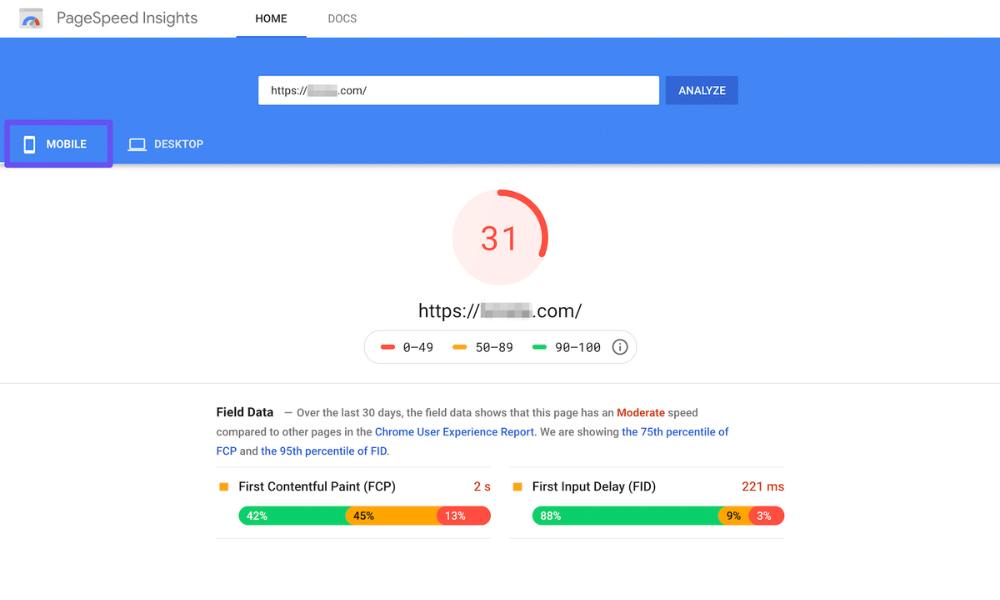
I test the site with PageSpeed Insights, GTmetrix, and WebPageTest.
This shows me:
- Load order
- File sizes
- JavaScript and CSS delays
- Core Web Vitals metrics
Step 2: Compress Media
I optimize every image using:
- EWWW Image Optimizer
- TinyPNG
- ShortPixel
Then I add lazy loading so images only load when needed.
Step 3: Enable Caching
Caching lets browsers store your page elements for faster loading later.
I use:
- WP Rocket
- WP-Optimize
- LiteSpeed Cache (on compatible hosts)
Step 4: Minify & Merge Files
I reduce the number and size of CSS and JS files.
This cuts HTTP requests and speeds up rendering—without breaking layouts.
Step 5: Add a CDN
A Content Delivery Network like Cloudflare helps deliver your content faster to users around the world.
Bonus: It often helps with security, too.
Tools I Use to Monitor and Improve Speed
Here’s my core toolset:
- Google PageSpeed Insights – for mobile/desktop metrics and suggestions
- GTmetrix – for waterfall load breakdowns
- WebPageTest – for real-world load performance
- Chrome DevTools – for identifying render-blocking files
- Cloudflare – for edge delivery and caching rules
- WP Rocket – for caching, minifying, and deferred loading
You don’t need a toolbox full of gear—just the right ones.
Why Speed Supports the Entire SEO Stack
Speed connects to every major part of your site’s performance:
- It helps bots crawl more of your pages
- It lowers bounce rates, which supports ranking
- It improves mobile UX
- It gives your structured data and content a better chance to shine
Want to see how speed fits into the full technical SEO picture?
Read my complete guide to technical SEO.
Final Takeaway: Fix Speed, Get Results
Let me wrap it up like this:
If your site loads slowly, you’re losing rankings.
You’re losing conversions.
And you’re creating a poor experience for everyone.
But here’s the upside—most speed issues are fixable.
No redesign needed. Just smart audits and a few technical improvements:
- Compress images
- Clean up scripts
- Set caching rules
- Use a CDN
- Prioritize mobile speed
And that’s exactly what I do.
If you’re serious about improving your visibility and getting more from your traffic, start here.
Because when it comes to speed—slow kills. Fast converts.



