


We’ve all seen it: a blog post stuffed with keywords, crammed with links, and “optimized” to the point where it barely makes sense.
On the flip side, you’ve probably also come across beautifully written pages that are a joy to read—but almost impossible to find in search.
So here’s the question I get all the time:
How do you create content that both ranks well and keeps readers engaged?
The answer? You don’t choose between SEO and user experience. You balance both—strategically.
In this post, I’ll show you exactly how I approach on-page content that performs in search and satisfies real people.
What You’ll Learn:
- Why SEO and UX don’t have to compete
- How I structure content for both users and search engines
- Practical ways to keep your writing readable without sacrificing rankings
- A checklist I follow before publishing any page
Need an on-page SEO refresher first? Here’s the guide to start with.
Why SEO and User Experience Must Work Together
Search engines don’t reward keyword stuffing anymore.
They reward content that answers questions, solves problems, and meets search intent.
And guess what? That’s exactly what users want too.
When SEO and UX are done right:
- You get higher rankings and more traffic
- Visitors stay longer and read more
- Engagement goes up, bounce rate goes down
- Your content builds trust, not frustration
So no—it’s not about choosing one over the other. It’s about using both together.
Step 1: Start With Search Intent (Then Serve the Reader)

Before I write anything, I ask one question:
What is the searcher really looking for when they type this keyword?
That becomes my guide for:
- Content structure
- Level of detail
- Call-to-action
- Visual layout
Whether it’s a blog post or a landing page, if your content matches intent, you’re already ahead of most.
Step 2: Use Keywords—Without Making It Obvious
Yes, keywords still matter. But no, you don’t need to jam them into every sentence.
Here’s how I approach it:
- Include the primary keyword in the title, H1, first paragraph, and one or two subheadings
- Use semantic terms naturally throughout the content
- Focus on answering the query—not repeating it
I cover this in detail in my keyword placement guide.
If you read your content out loud and it sounds robotic—it needs a rewrite.
Step 3: Format Content for Readability
SEO might bring people in, but UX keeps them there.
Here’s how I make content easy to read:
- Break up text with short paragraphs (2–4 lines max)
- Use H2s and H3s to guide flow
- Add bullets, bolded key phrases, and visuals when needed
- Use a font size and layout that feels comfortable on mobile and desktop
Pro tip: your blog is not a term paper. It needs to feel light, scannable, and skimmable.
For formatting best practices, check out this guide on structuring content with headers.
Step 4: Keep the Language Clear and Conversational
No one likes reading content that sounds like it came from a robot or a legal document.
So I:
- Write at a 9th-grade reading level
- Use active voice
- Avoid jargon (unless the audience expects it)
- Ask occasional rhetorical questions to keep the tone engaging
- Cut filler that adds no value
Your audience shouldn’t need a dictionary to understand your point.
Step 5: Use Internal Links to Guide (Not Distract)
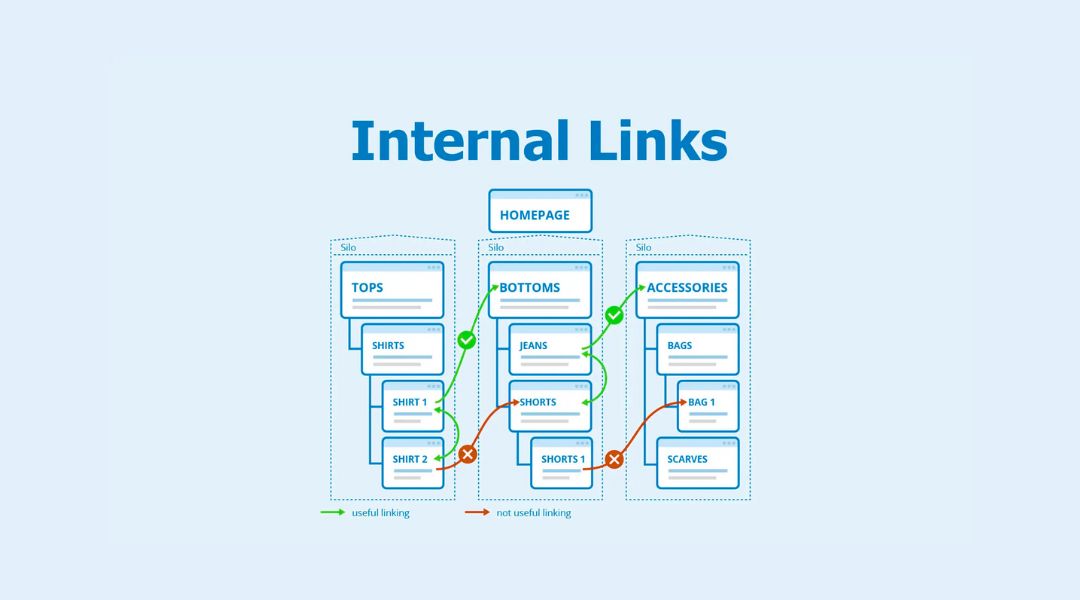
Internal linking supports both SEO and UX when done right.
My rules:
- Link to relevant content, naturally
- Use anchor text that clearly describes what the reader will find
- Avoid overlinking—2 to 4 per 1,000 words is usually enough
Need more on this? I cover smart internal linking in this post.
Bonus: linking to helpful content increases time on site and builds topic authority.
Step 6: Optimize for Mobile First
Most people are reading your content on their phone.
That’s why I always test content on mobile before publishing. I look for:
- Headings that break cleanly
- Text that’s easy to read without zooming
- Tap-friendly CTAs and links
- No weird layout shifts on scroll
If your content is hard to navigate on a phone, no one’s staying long enough to read it—or share it.
Step 7: Use CTAs That Fit the Content (Not Fight It)
A good CTA matches the reader’s stage of intent.
For a how-to blog post:
- “Explore the full checklist”
- “See more optimization tips”
- “Buy our product now!” (unless it makes sense contextually)
Your CTA should feel like the next logical step, not a hard sell slapped onto the end of the page.
Common SEO vs. UX Conflicts (and How I Solve Them)

Here are a few conflicts I see—and how I fix them:
Over-Optimization vs. Clarity
Fix: Prioritize natural language. One well-placed keyword beats five forced ones.
Keyword-Stuffed Headers vs. Readable Structure
Fix: Use a keyword once per heading section. Make the rest descriptive and helpful.
Endless Paragraphs for “Content Length”
Fix: Write just enough to answer the query. Cut the fluff. Add structure.
SEO Plugins Saying “Add More Keywords!”
Fix: Trust your human judgment. Tools help—but readers matter more.
My SEO + UX Content Publishing Checklist

Before I publish any page, I ask:
- Does this content solve the searcher’s problem clearly?
- Is the language readable and free of filler?
- Are keywords placed naturally?
- Is the structure scannable with clear headings?
- Do the links and CTAs feel helpful?
- Does it look clean and easy to read on mobile?
If I can check all these boxes, I hit publish.
Final Thoughts
Balancing SEO and user experience isn’t about walking a tightrope—it’s about creating content that serves people well and gets discovered.
When done right, your content becomes easy to find and easy to enjoy.
That’s how I approach every piece I write or optimize:
Make it searchable. Make it usable. Make it valuable.
If you’re struggling to keep both sides happy, let’s fix that—because strong SEO and strong UX should always go hand in hand.



