Even in 2025, crawlability is one of the most overlooked aspects of technical SEO.
It’s not glamorous. There’s no traffic spike the moment you fix one. But when your pages aren’t being crawled—or worse, being crawled inefficiently—everything else in your SEO strategy suffers.
Let me walk you through how I diagnose crawl errors, fix them, and keep them from coming back.
What You’ll Learn in This Article
Here’s what I’ll walk you through:
- What crawl errors actually are (and why they matter)
- Where I find crawl issues using free and pro tools
- Common problems that block or waste crawl budget
- How I fix crawl errors step-by-step
- What I do to prevent them moving forward
What Crawl Errors Actually Are
Let’s keep it simple:
Crawl errors are issues that prevent search engine bots (like Googlebot) from properly accessing your pages.
When bots hit an error, they can’t crawl your page. And if they can’t crawl, they can’t index.
There are two main types of crawl issues:
- Site-level errors: Issues affecting the entire domain (e.g., server errors, robots.txt blocks)
- URL-level errors: Problems affecting specific pages (e.g., 404s, soft 404s, redirect loops)
Even small crawl issues—if repeated—can lead to dropped rankings or poor index coverage.
Where I Diagnose Crawl Errors
I use a combination of free and premium tools to get the full picture.
1. Google Search Console (GSC)
Under Indexing > Pages, I check:
- Crawled – currently not indexed
- Discovered – not crawled
- Blocked by robots.txt
- Soft 404
- Redirect errors
I also look under Settings > Crawl stats for patterns in:
- Crawl volume
- Server errors
- Response codes
2. Screaming Frog SEO Spider
I run a full site crawl to:
- Spot broken internal links
- Find pages returning non-200 status codes
- Identify redirect chains
- Verify canonical and noindex settings
3. Log File Analysis (or Bot Behavior Reports)
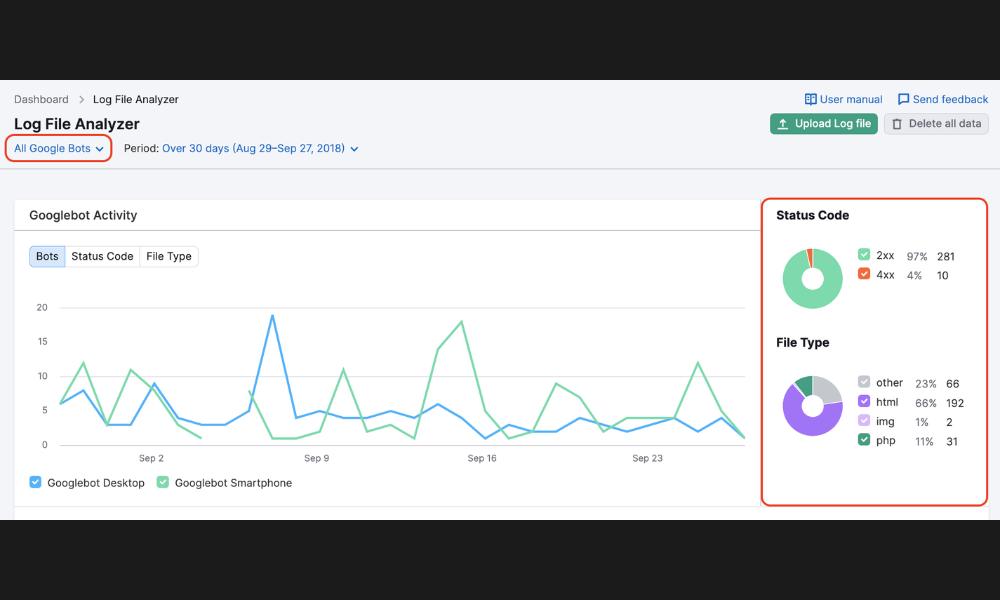
On larger sites, I use raw access logs (or tools like JetOctopus or Semrush) to see:
- What Googlebot is crawling
- How often bots hit error pages
- What content they’re ignoring
This gives me real visibility into wasted crawl budget.
Common Crawl Errors I Fix
These show up in almost every audit—some are small, some are severe.
1. 404 Errors (Page Not Found)
Why it matters:
Bots hit these dead ends and waste crawl effort.
How I fix it:
- Redirect valid deleted pages to the next most relevant content
- Remove broken links internally
- Fix typos in URL references
2. Soft 404s
Why it matters:
These return a “200 OK” status but display a “Not Found” message—confusing search engines.
How I fix it:
- Return proper 404 or 410 codes for dead content
- Improve thin pages with real value if they were mistakenly flagged
3. Redirect Chains or Loops
Why it matters:
Chains slow crawling. Loops prevent it altogether.
How I fix it:
- Replace multi-step redirects with a single 301
- Eliminate internal links that point to redirected URLs
- Audit .htaccess or redirect plugins for accidental loops
4. Blocked Resources
Why it matters:
CSS, JavaScript, or images blocked by robots.txt prevent full rendering.
How I fix it:
- Allow essential resources to be crawled
- Test rendering in GSC’s URL Inspection tool
- Update robots.txt to remove unnecessary disallow rules
5. Crawl Budget Waste
Why it matters:
On large sites, bots may never reach your most important pages.
How I fix it:
- Block low-value URLs (e.g., filters, archives) in robots.txt
- Remove crawlable pagination if not needed
- Consolidate duplicate content and fix internal linking
My Crawl Error Fix Process
Here’s how I handle crawl errors during a technical SEO project:
Step 1: Crawl and Index Audit
- Run Screaming Frog, GSC, and log analysis
- Map URL-level errors and categorize by type
- Prioritize based on traffic and importance
Step 2: Fix Sitewide Settings
- Review robots.txt for over-blocking
- Check meta robots and canonical tags
- Review sitemaps for accuracy and 200 status
Step 3: Clean Up URLs
- Remove broken internal links
- Fix redirects and update internal references
- Replace or remove orphaned URLs
Step 4: Submit Updated Pages
- Use URL Inspection in GSC to request reindexing
- Re-submit updated sitemaps
- Monitor crawl stats for change
How I Prevent Crawl Errors Going Forward
Fixing is good. Preventing is better.
Here’s what I set up to reduce future crawl issues:
- Weekly or monthly Screaming Frog crawls
- Automatic 404 alerts using site monitoring tools
- Internal link audits before new content goes live
- Structured redirects using a plugin or server config
- Regular robots.txt and sitemap reviews
It’s not a one-time task. Crawl health is part of ongoing SEO maintenance.
Final Takeaway: Crawlability = Visibility
Here’s the truth:
If Google can’t crawl your content, it can’t rank it.
If it wastes time on junk URLs, it might miss the pages that matter.
Crawl errors don’t just affect SEO—they affect the foundation your entire visibility sits on.
That’s why I include crawl auditing in every technical SEO package.
If you haven’t checked your crawl health lately, start here:
Diagnosing and Fixing Crawl Errors in 2025
Because content can’t perform if it can’t be found.