


Let’s be honest—Google Ads is powerful, but setting it up wrong? That’s an expensive hobby.
I’ve reviewed hundreds of accounts over the years, and most underperforming campaigns have one thing in common: setup mistakes that were totally avoidable.
So, before you pour more dollars into clicks that don’t convert, let’s talk about the most common setup mistakes I see—and how to fix them before they drain your budget.
Skipping a Clear Campaign Goal
Google asks what your objective is for a reason. If you skip this step or click something random just to “get started,” your campaign’s likely heading nowhere fast.
Be specific. Are you trying to:
- Get leads?
- Drive phone calls?
- Sell products?
- Book appointments?
Vague goals lead to vague campaigns. Start here if you’re unsure how to set one up properly.
Targeting the Entire Country (When You Only Serve One City)
Unless you’re Amazon or have a teleportation device, don’t run ads nationwide if your service area is local.
Go into your campaign settings and set geographic targeting for your actual service area. Even better? Use radius targeting around your office or store.
I explain how to do this in my audience targeting setup guide.
Throwing All Keywords into One Ad Group
This is the digital equivalent of dumping your entire closet into one drawer and expecting to find your socks fast.
Each ad group should focus on one specific keyword theme. That way, your ads are more relevant, your Quality Score improves, and your budget works harder.
Here’s how I organize campaigns the right way.
Using Broad Match Keywords Without Supervision
Broad match keywords might sound like a good idea (“More traffic!”), but left unchecked, they’ll spend your budget on terms that have nothing to do with your offer.
Example: Targeting “plumbing services” might also show your ad for “how to fix a toilet yourself”—not ideal if you want to sell, not teach.
Want to do keyword research that actually works? Read this first.
Not Adding Negative Keywords
Negative keywords are the unsung heroes of a lean, efficient campaign.
Without them, your ad could show up for searches like:
- “Free business coach”
- “Plumbing job application”
- “DIY digital marketing tips”
Unless you enjoy paying for unqualified traffic, build a negative keyword list from Day 1—and update it weekly.
Sending All Traffic to the Homepage
Your homepage is probably fine. But your offer-specific landing page? That’s what converts.
Each ad should go to a page that matches its message. If your ad says “Get a Free Estimate,” don’t make people search for the form—put it right in front of them.
Need help building high-converting pages? Start here.
Forgetting to Set Up Conversion Tracking
No conversion tracking = flying blind.
How will you know if your campaign is working? Spoiler: You won’t. Google won’t either, which makes optimization a pain.
Track what matters:
- Form submissions
- Phone calls
- Sales
- Button clicks
Here’s a full setup guide that walks you through it all. If you skip this, you’re just spending to “feel busy.”
Letting Google Auto-Apply Recommendations Without Review
Yes, Google loves giving suggestions. No, not all of them are helpful.
Auto-applied changes can mess with:
- Keyword match types
- Budget distribution
- Ad copy
- Bidding strategy
Review everything before accepting it. And yes—you can disable auto-apply. I recommend it.
Not Using Ad Extensions
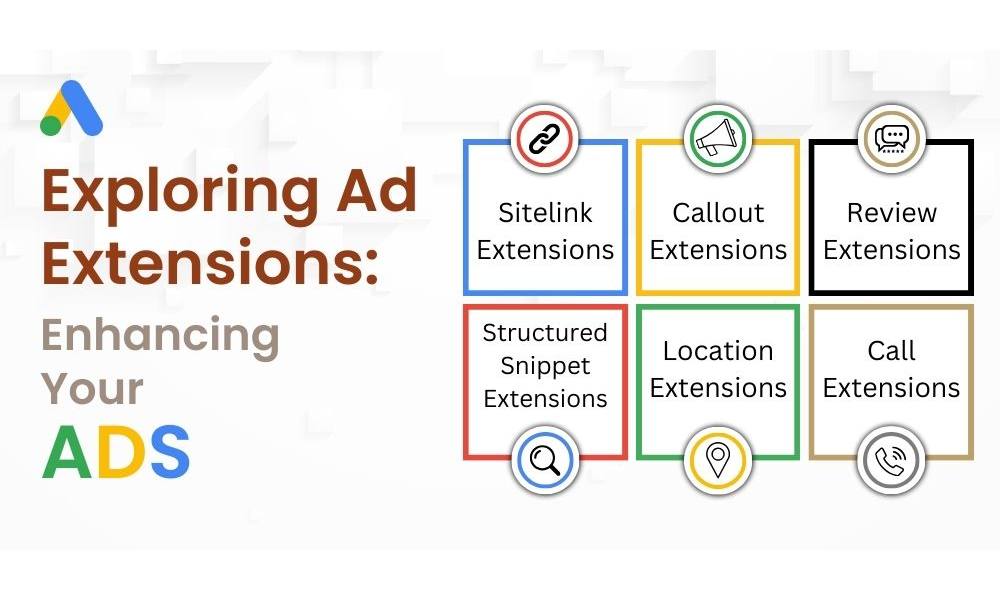
Ad extensions = extra real estate on the search results page. They cost nothing extra and boost your chances of getting clicks.
Examples include:
- Site links
- Callouts
- Structured snippets
- Phone numbers
- Location info
Not sure what to write in them? This guide on ad copy includes extension tips.
Setting and Forgetting Your Campaign
This one’s big. Google Ads is not a crockpot—you don’t “set it and forget it.”
Check performance weekly. Tweak ads. Add new keywords. Pause poor performers. Update your negative list. And test new copy regularly.
Want a smarter post-launch process? I’ve outlined it here.
Bonus Mistake: Trusting Smart Mode with Your Whole Budget
Smart Mode sounds convenient, but it’s often too automated for its own good—especially if you’re just starting out.
I recommend switching to Expert Mode early on. It gives you full control over:
- Keywords
- Bidding
- Targeting
- Ad formats
Trust me, it’s worth the extra 10 minutes.
Don’t Burn Budget on Bad Setup
Most campaign issues start with poor foundations. But once you fix these setup mistakes, everything else starts working better:
- Better targeting = better leads
- Smarter keywords = lower costs
- Good tracking = clear ROI
Want to build your next campaign the right way? Start with this beginner-friendly walkthrough, or go deeper with my full setup guide.
Need a second pair of eyes on your existing setup? I’m happy to take a look.



