



Even great content can underperform if your technical foundation is off. And most of the time, it’s not because of a complex algorithm shift—it’s the simple stuff: broken links, duplicate tags, slow pages, or blocked files.
Let me walk you through the most common technical SEO mistakes I see (and fix) every week—so you can avoid them and actually get the rankings your content deserves.
What You’ll Learn in This Article
Here’s what I’ll walk you through:
- The most common technical SEO errors that quietly hurt performance
- How I discover them during audits
- Simple fixes to get your pages crawling, indexed, and ranking
- The tools I use to catch these issues before they spread
- A preventative checklist I follow to avoid them long-term
1. Broken Internal Links
The Problem
You link to a page internally, but that page no longer exists or returns a 404 error.
Why It Hurts
- Wastes crawl budget
- Creates dead ends for bots and users
- Hurts internal linking signals
How I Fix It
- Run a Screaming Frog crawl to find 404s
- Update or remove broken links
- Set up 301 redirects for deleted pages if needed
2. Duplicate Content and Canonical Tag Confusion
The Problem
Multiple versions of the same content exist (or appear to), and the canonical tag either doesn’t exist or points to the wrong URL.
Why It Hurts
- Splits ranking signals
- Confuses search engines
- May lead to deindexing of key pages
How I Fix It
- Audit canonicals using Screaming Frog or Ahrefs
- Make sure each page has a self-referencing canonical
- Avoid duplicate versions (e.g. with and without trailing slash or query strings)
3. Noindex or Robots.txt Blocking Valuable Pages

The Problem
You accidentally block pages from being crawled or indexed using meta tags or robots.txt.
Why It Hurts
- Important content never appears in search
- Google can’t access your key assets or content
- Indexing coverage drops without explanation
How I Fix It
- Check meta robots and robots.txt line by line
- Use Google Search Console’s URL Inspection Tool
- Remove noindex tags where they don’t belong
- Allow crawling of necessary JS, CSS, and page content
Need a refresher? Here’s how I use robots.txt the right way
4. Slow Page Load (Especially on Mobile)
The Problem
Pages take too long to load due to bloated images, scripts, or poor hosting.
Why It Hurts
- Tanks Core Web Vitals
- Increases bounce rate
- Hurts both UX and rankings
How I Fix It
- Use PageSpeed Insights and GTmetrix
- Compress images, minify CSS/JS
- Implement caching and lazy loading
- Use a CDN like Cloudflare
Already struggling with load time? Check out my full speed optimization checklist
5. Improper Redirect Chains or Loops
The Problem
One page redirects to another, which redirects to another… or back to itself.
Why It Hurts
- Slows down crawl
- Wastes link equity
- Confuses users and bots alike
How I Fix It
- Identify chains using Screaming Frog or Sitebulb
- Replace multi-step redirects with direct ones
- Update internal links to point to the final URL
6. Missing or Inconsistent Structured Data
The Problem
Pages either lack schema markup or use broken/invalid markup.
Why It Hurts
- Makes your site ineligible for rich snippets
- Reduces search visibility
- Sends mixed signals to search engines
How I Fix It
- Add appropriate JSON-LD using Rank Math or manual code
- Validate schema with Google’s Rich Results Test
- Match structured data to the actual page content
More on that here: Structured vs. Unstructured Data for SEO
7. Orphaned Pages (No Internal Links Pointing to Them)
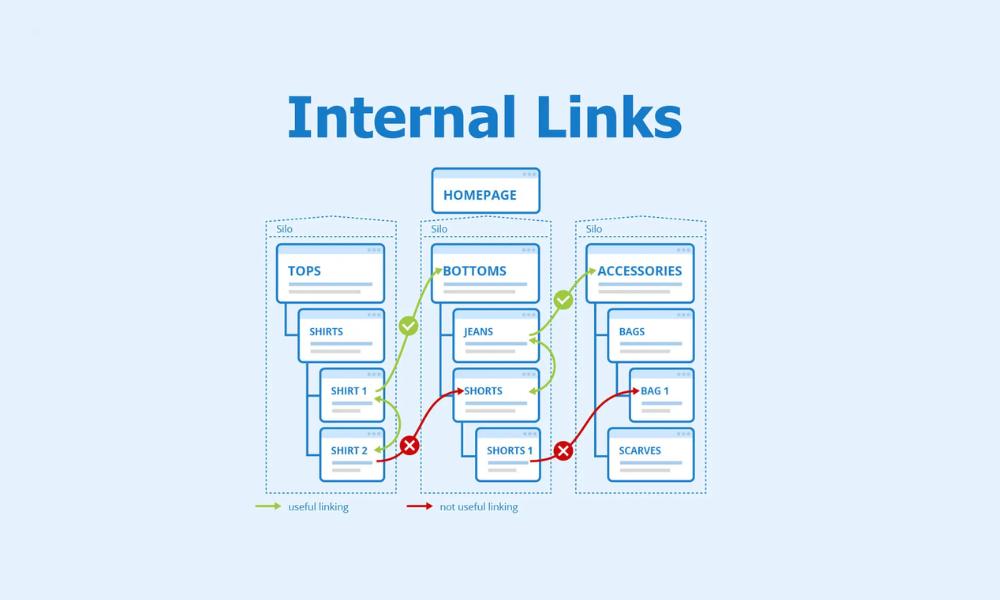
The Problem
You publish content, but nothing links to it internally.
Why It Hurts
- Search engines may never crawl it
- No link equity passed
- It stays buried—even if the content is great
How I Fix It
- Find orphaned pages using Screaming Frog (crawl + sitemap mode)
- Link to them from relevant posts, hubs, or nav menus
- Prioritize cornerstone content in your internal linking strategy
8. Outdated or Incorrect XML Sitemaps
The Problem
Your sitemap includes deleted, redirected, or noindexed URLs.
Why It Hurts
- Wastes crawl budget
- Confuses search engines
- Causes unnecessary index bloat
How I Fix It
- Regenerate sitemap using Rank Math or Yoast
- Submit updated sitemap in Google Search Console
- Remove non-200 URLs
Here’s why clean sitemaps still matter
9. Mobile Usability Issues
The Problem
Your mobile version isn’t fully responsive or causes tap, scroll, or layout issues.
Why It Hurts
- Fails Google’s mobile-first indexing criteria
- Kills UX and engagement
- Hurts Core Web Vitals
How I Fix It
- Test with Search Console’s Mobile Usability report
- Use Lighthouse to analyze tap targets, font size, and layout
- Fix CSS issues or use mobile-friendly themes
More tips: Mobile Optimization SEO Best Practices
Final Takeaway: Technical SEO Is Maintenance, Not Magic
Here’s the reality:
You don’t need to fix all of these overnight.
But if you’re not fixing them at all, you’re capping your growth—no matter how good your content is.
Technical SEO isn’t a one-time task. It’s ongoing.
That’s why I include these fixes in every SEO audit and retainer I handle.
If you’re unsure where to start, this guide will help you spot and fix the biggest issues.
Because in SEO, what you don’t see usually hurts the most.



